Dealer Edge Quick Start
Get trading in 5 minutes. This guide is for new users who want to start immediately.
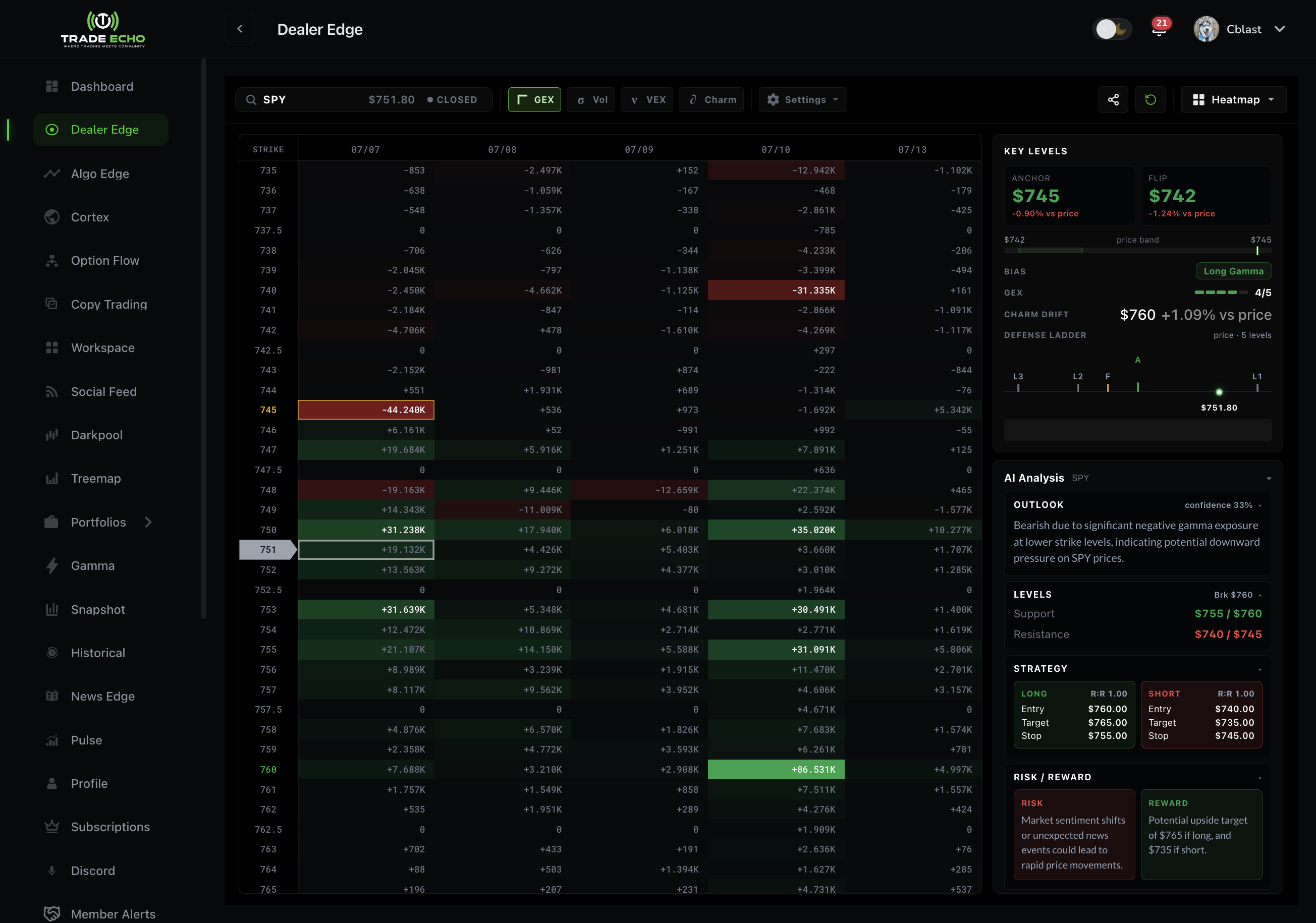
Session mantra: Levels first. Direction second. Size last.
For the full Dealer Edge → Charm → Pulse workflow, live read template, and daily routine, see Charm + Pulse Workflow.
The 60-Second GEX Read
Step 1: Find the Anchor
Locate the brightest or largest gamma concentration on the GEX shelf. This is the primary magnet price may gravitate toward.
Step 2: Compare Price with the Anchor (direction)
- Price BELOW anchor - Bullish magnet up toward the anchor
- Price AT anchor - Neutral / premium-selling zone
- Price ABOVE anchor - Bearish magnet down toward the anchor
Step 3: Read the GEX Rating (day type, not direction)
The rating describes how the day may trade - stable, mixed, or volatile. It does not tell you bullish vs bearish by itself.
| Rating | Regime | What it usually means |
|---|---|---|
| 4-5 | Positive gamma | Stable, slow, smooth. Pinning and structured breakouts often work best when Anchor and Flip agree. |
| 3 | Neutral / mixed | Reduce size, expect range behavior, avoid forcing a hero trade. |
| 1-2 | Negative gamma | Fast and volatile. Breakouts can run and reversals can snap. Size down. |
Step 4: Locate the Flip
- Above the Flip - Generally the more stable positive-gamma side
- Below the Flip - Volatility can expand
Know which side price is on before increasing size.
Key Distinction
| Signal | Role |
|---|---|
| Price vs Anchor | Directional magnet |
| GEX Rating | How aggressively or smoothly that move may trade |
Do not use the rating as a calls-vs-puts shortcut. Direction comes from price vs Anchor. The rating sets environment.
What is GEX?
GEX (Gamma Exposure) shows how market makers are positioned across strikes and expirations.
- Positive gamma - Dealer hedging tends to dampen moves (sell rallies, buy dips)
- Negative gamma - Hedging can amplify movement and expand volatility
Result: Price gravitates toward large positive gamma concentrations (the Anchor).
How to Read the Heatmap
- Each tile = strike x expiration
- Brightness = strength of gamma magnet
Color Meaning
- Positive Gamma (Green): Stabilization - price gravitates to these levels
- Negative Gamma (Red): Volatility - price accelerates through these levels
Key Patterns
- Vertical Walls: Strong multi-day support/resistance
- Horizontal Bands: Expiration clusters (OpEx magnets)
Understanding Key Levels
Anchor Point
Highest gamma exposure - strongest magnet for price.
Defense Lines
Secondary levels (roughly 60-80% of anchor strength). Backup support/resistance.
GEX Flip Point
Where net gamma changes sign.
- Above flip - positive gamma - stable, supportive
- Below flip - negative gamma - volatility can expand
See Anchor Points, Defense Lines, and GEX Flip Points for a deeper dive.
Bullish Pinning Playbook (high confluence)
When all three align:
- Price is below the Anchor - magnet is above current price
- GEX Rating is 4 or 5 - positive gamma, pin-friendly environment
- Price is above the Flip - on the stable side of the regime
Look for structured breakouts or buyable pullbacks with the Anchor as the magnet target. Avoid random mid-range entries.
Volatile Breakdown (inverse)
- Price above the Anchor - bearish magnet down
- GEX Rating 1-2 - negative gamma, amplified movement
- Price below the Flip - volatility expansion zone
Expect faster moves and sharper reversals. Reduce size and define risk before entry.
Beyond GEX: Charm and Pulse
GEX maps the dealer magnet and volatility regime. Charm maps time-decay concentration - read it by location relative to price, not color alone. See Charm Lens.
Pulse puts the same GEX and Charm Drift levels on the live chart. See Pulse Quick Start and Charm + Pulse Workflow.
The heatmap has four lenses on one grid: GEX, Vol, VEX, and Charm. Net Flow adds session flow pressure. Alerts include Anchor Approach, Charm Stack at Anchor, and Flip Cross.
Common Mistakes to Avoid
- Using GEX Rating for direction - Rating = day type. Anchor = direction.
- Fighting the Anchor - Price gravitates toward the anchor
- Selling premium in 1-2/5 - Volatile tape favors defined-risk directional trades, not short premium
- Reading Charm by color only - Always note whether the concentration is above or below current price
- Misreading positive gamma - Positive gamma = stability, not automatic bullishness
Quick Reference
Direction (price vs Anchor)
- Below - bullish magnet up
- At - neutral / premium-selling zone
- Above - bearish magnet down
Day type (GEX Rating)
- 4-5 - stable | slow | smooth
- 3 - mixed | range
- 1-2 - violent | fast | volatile
Checklist
- Found Anchor and Flip
- Noted price vs Anchor (direction)
- Noted GEX Rating (day type)
- Switched to Charm for 0DTE / front-week reads
- Confirmed levels on Pulse before entry
Trade Echo docs are for product education only - not financial advice.