NewsEdge Quick Start
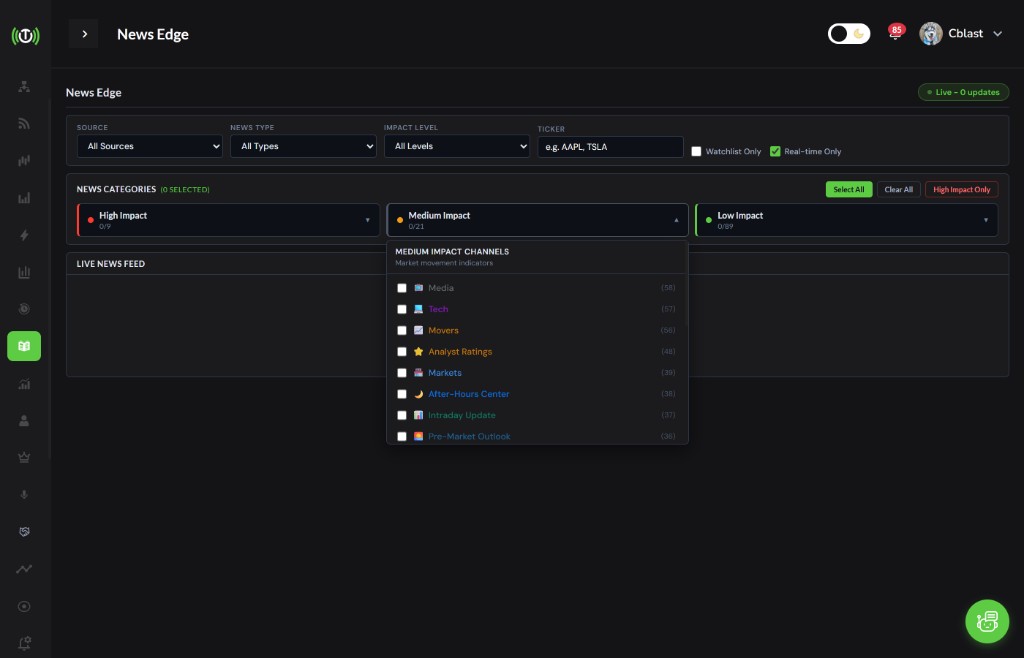
NewsEdge is Trade Echo's premium market intelligence tool. It delivers real-time news with a 20-second auto-refresh, so you see catalysts before they move the market. Filter by impact level, source, ticker, and watchlist to focus on what matters for your trades.
What is NewsEdge?
What You Get
- Real-Time News: Headlines as they break, not minutes later
- 20-Second Auto-Refresh: Stay ahead of the crowd
- Impact-Level Filtering: High, Medium, Low - trade the catalysts that move stocks
- News Type Presets: One-click filters for earnings, analyst activity, FDA, M&A, and more
- Watchlist Integration: Track news for your specific tickers
Why NewsEdge Matters
News moves markets. Earnings beats, FDA approvals, analyst upgrades - these events cause 2-10% stock moves in minutes. NewsEdge surfaces them first so you can act before the move is over.
Impact Levels
| Level | Examples | Typical Stock Move |
|---|---|---|
| High | Earnings, FDA, M&A, CEO changes, regulatory | 2-10% |
| Medium | Analyst upgrades/downgrades, guidance, partnerships | 1-5% |
| Low | Commentary, research, routine filings | Under 1% |
Filter by impact level to match your trading style. Day traders focus on High. Swing traders use High + Medium. Position traders may include Low for context.
News Type Presets
Five presets let you target specific trading setups:
| Preset | Focus | Best For |
|---|---|---|
| Earnings Focus | Beats, misses, guidance | Earnings plays |
| Analyst Activity | Upgrades, downgrades, initiations | Analyst-driven moves |
| Corporate Actions | M&A, splits, dividends | Event arbitrage |
| Biotech Catalyst | FDA approvals, trial results | Biotech plays |
| Market Moving | High-impact news across all categories | Scalping, momentum |
Using Filters
Source Filter
Filter by source type - stock news vs. press releases.
Impact Level
- High: Earnings, FDA, M&A, CEO, regulatory - expect 2-10% moves
- Medium: Analyst, guidance, partnerships - expect 1-5% moves
- Low: Commentary, research, routine - expect under 1% moves
Ticker Filter
Enter a symbol to see only news for that stock. Useful for pre-market prep on your watchlist.
Watchlist Filter
Show news only for tickers in your watchlist. Keeps your feed focused.
Real-Time Toggle
Enable real-time mode for live updates. Disable to reduce noise when reviewing.
Quick Reference
Daily Workflow
- Pre-Market: Open NewsEdge, filter by High or Earnings Focus
- 9:30 AM: Enable real-time toggle, watch for first catalyst
- Throughout Day: Check Medium impact for analyst moves, partnerships
- Before Close: Review Low impact for next-day context
Decision Tree
START → NewsEdge Alert
Impact Level?
├─ HIGH → Check ticker, chart, volume → Trade if setup fits
├─ MEDIUM → Assess relevance to your watchlist → Consider swing
└─ LOW → Skim for context or ignore
Top 5 Rules
- Filter by impact - High for day trades, Medium for swings
- Act fast on High - 2-10% moves happen in minutes
- Confirm with chart - News + price action = higher conviction
- Use presets - Earnings Focus, Analyst Activity, Biotech Catalyst
- Watchlist first - News on your tickers = priority
Common Questions
How often does NewsEdge refresh?
Every 20 seconds in real-time mode.
Can I filter by multiple impact levels?
Yes. Select High + Medium for a broader feed, or High only for day trading focus.
Does NewsEdge show pre-market news?
Yes. Real-time news includes pre-market and after-hours releases.
What if I miss a High-impact alert?
Check the chart. If the move hasn't started or is still early, you may still have entry. If it's already extended, wait for the next catalyst.
Next Steps
- Impact Levels - Deep dive on High, Medium, Low
- Trading Catalysts - Five strategies using NewsEdge