Market Treemap
Trade Echo's market treemap is a market-wide heatmap. Each tile is sized by weight (market cap or index weight) and colored by stock performance. Use it to scan breadth, then tap any ticker to open Dealer Edge for depth on that name.
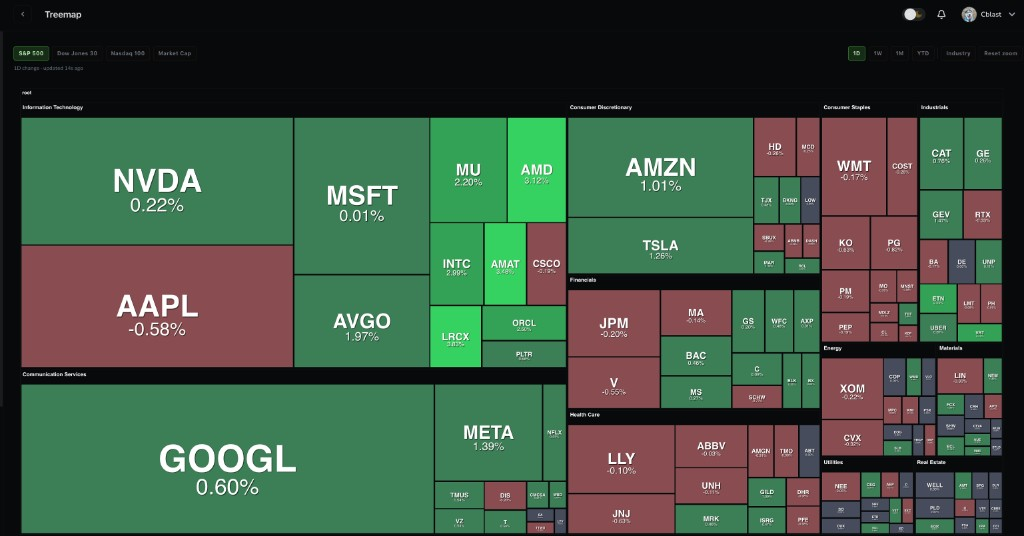
Treemap vs Dealer Edge GEX heatmap
| Tool | Scope | Color means |
|---|---|---|
| Treemap | Many tickers (index or cap universe) | Stock performance (1D / 1W / 1M / YTD) |
| Dealer Edge | One ticker, strikes x expiries | GEX, Vol, VEX, or Charm by strike |
Do not confuse them. Treemap answers who is moving; Dealer Edge answers where dealers are positioned on the name you pick.
Universe toolbar
| Universe | Layout |
|---|---|
| S&P 500 | Top names per GICS sector; optional Industry grouping |
| Dow 30 | Dow components |
| Nasdaq 100 | Nasdaq-100 leaders by index weight |
| Market Cap | Mega band on top, Large below, Nano last (stacked vertical bands) |
| Watchlist | Your saved tickers as a flat equal-size grid (color = % change; no sector grouping) |
The Watchlist universe reads the same central watchlist used by Dealer Edge Focus and the Workspace watchlist tile - edit it once and it updates everywhere.
Performance lenses
Switch 1D, 1W, 1M, or YTD to change the color on every tile. During regular market hours the map refreshes silently so change % stays aligned with the web cache.
Industry toggle groups index universes by sector. It is disabled on Market Cap (bands replace sector layout).
Navigation
- Zoom / pan on web; Reset zoom restores the default view
- Tap or click a tile to open Dealer Edge on that ticker (web and mobile)
- Cache age shows when the snapshot last updated
How to use the Treemap
Pre-market
Scan for green vs red sector clusters before 9:30 AM ET. Note outliers - green names in red sectors (relative strength).
With OptionFlow
OptionFlow shows bullish flow on a name - check treemap. Is it in a green sector? Higher conviction.
With Dealer Edge
Treemap finds the name. Dealer Edge reads gamma, flip, walls, and lens (GEX / Vol / VEX / Charm) on that ticker.
Web and mobile parity
Web (Trade Echo dashboard → Treemap) and mobile (Markets → Treemap) share the same universes, performance lenses, stacked Market Cap layout, and tap-through to Dealer Edge.
Quick reference
- Pick universe (S&P 500, Dow, Nasdaq 100, or Market Cap)
- Pick performance lens (1D default for session context)
- Scan hot and cold sectors
- Tap a leader → Dealer Edge for strike-level read
Next Steps
- Dealer Edge Quick Start - single-ticker GEX heatmap
- Charm Lens - fourth Dealer Edge lens near expiry
- OptionFlow Quick Start - confirm treemap ideas with flow