Discord Server Guide
Your trading community hub. Navigate channels, enable alerts, use bot commands, and get the most from the Trade Echo Discord server.
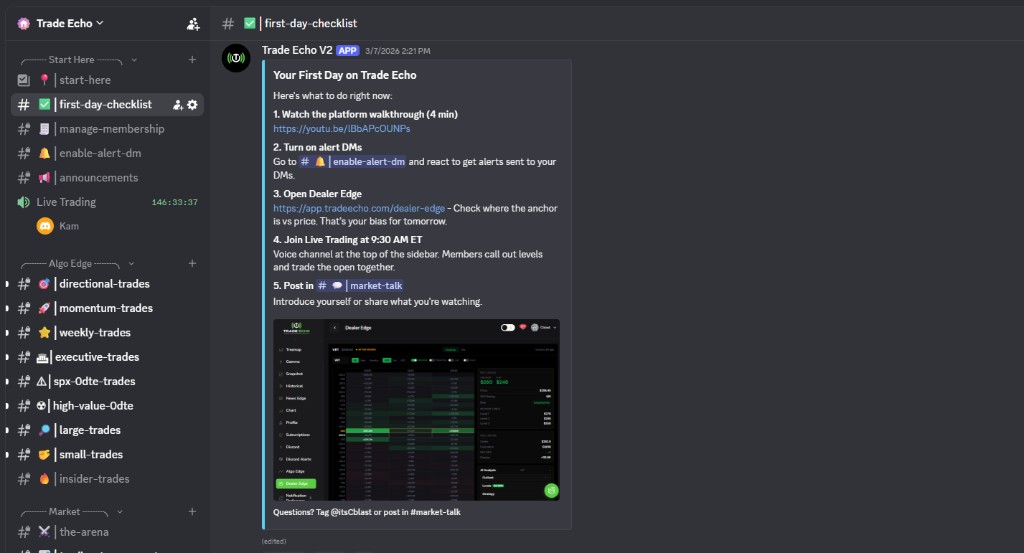
Algo Edge Trading Channels
Real-time algorithmic trading signals and analysis. A channel for each setup style:
| Channel | Description | Best For |
|---|---|---|
| Momentum Trades | High-momentum setups for day trading | Quick scalps, momentum plays |
| SPX 0DTE Trades | Same-day expiration SPX options | Aggressive 0DTE trading (high risk) |
| Large Trades | Major movements (>1,000 contracts, >$1M value) | Following institutional flow |
| High Value 0DTE | High-impact same-day trades across major indices | Premium 0DTE opportunities |
| Weekly Trades | Short-term market bets expiring within a week | Swing trading |
| Directional Trades | Market sweeps across multiple exchanges | Directional bias confirmation |
| Executive Trades | SPY/QQQ index strategies | Index-based trading |
| Small Trades | Niche momentum opportunities | Stock picking, niche plays |
Pro Tip: Enable notifications for 2-3 channels that match your trading style. Avoid information overload.
Trading Hub Community
Connect with other traders and share insights:
| Channel | Use For |
|---|---|
| Market News | Latest updates, earnings, Fed announcements |
| Share Success | Share winning trades and learn from others |
| Market Talk | General market discussion and analysis |
| Trade Analysis | In-depth analysis of specific trades |
| Watchlist | Stocks and assets to monitor |
Trade Alerts
Stay informed with real-time opportunities:
| Channel | Access | Description |
|---|---|---|
| 2K Cblast | Premium members only | Premium 2K+ profit alerts |
| Cblast Alerts | All members | Standard trading alerts |
| VIP Alerts | VIP tier members | Exclusive VIP member alerts |
| 2K Forged by Steel | Steel strategy subscribers | High-value trades from Steel strategy |
| Member Alerts | Use !follow @trader | Community-generated alerts from followed traders |
Discord trade alerts are also parsed into structured trade cards in the dashboard - see the Member Alerts (In-App) hub with Top Traders and Following views.
Setting Up Your Alerts
- Go to the enable-alert-dm channel
- Enable notifications for desired alert types
- Use
!follow @usernameto follow specific traders - Receive DMs when followed traders post alerts
Education Category
Master advanced trading strategies:
| Channel | Learn |
|---|---|
| BT Cloud | Cloud-based trading strategies |
| Golden Zone | Fibonacci-based strategies |
| ORB | Range break trading methodology (Opening Range Breakout) |
| Strike to Pick | Options strike selection guide |
| SPX 0DTE | 0DTE trading methodology |
Bot Commands
Track performance and manage trades:
| Command | Description | Example |
|---|---|---|
!trades [@user] | View trade history for yourself or another user | !trades or !trades @trader123 |
!open | See your currently open trades | !open |
!stats [@user] | View trading statistics and performance metrics | !stats or !stats @trader123 |
!leaderboard [duration] | Check the leaderboard (week/month/all time) | !leaderboard week |
!current [@user] | View current open positions for a user | !current @trader123 |
!follow @trader | Follow a trader to receive their Member Alerts | !follow @top_trader |
Using Commands Effectively
- Use
!tradesregularly to track your performance - Check
!leaderboardto see where you rank - Use
!statsto analyze your trading patterns - Follow successful traders with
!follow
Notification Settings
| Setting | How to Adjust |
|---|---|
| Server Notifications | Server settings - Notifications (default: @mentions and DMs) |
| Challenge Notifications | Go to enable-alert-dm channel and follow instructions |
| User DM Alerts | Use !follow @trader to get DMs when they post |
Recommended Setup
- Enable notifications for your main Algo Edge channels
- Go to enable-alert-dm for challenge notifications
- Use
!followto follow top traders - Set Member Alerts to "Notify me"
- Enable Market News notifications
Quick Start Guide
Your First 5 Steps
- Explore channels - click through Algo Edge channels to see what interests you
- Enable notifications - right-click channel - "Notification Settings" - Enable notifications
- Try bot commands - type
!tradesto see your trade history - Post your first alert - after a trade, post in Member Alerts
- Engage in community - join discussion in Market Talk or Trade Analysis
Daily Routine
- Morning (9:30 AM): Check Market News and Algo Edge channels
- During Trading: Post alerts as you trade
- After Trading: Share insights in Trade Analysis
- Evening: Check leaderboard with
!leaderboard - Weekly: Review your stats with
!stats
Best Practices
Do:
- Post accurate alerts in real-time
- Share your reasoning and analysis
- Support and encourage other traders
- Engage positively in discussions
- Follow successful traders to learn
Don't:
- Post fake or misleading alerts
- Spam channels with low-quality content
- Be negative or discouraging to others
- Self-promote excessively