Member Alerts
Member Alerts brings the Trade Echo Discord trade-alert community into the web dashboard and mobile app. Read parsed alerts, follow top traders, and manage notifications without living in Discord all day.
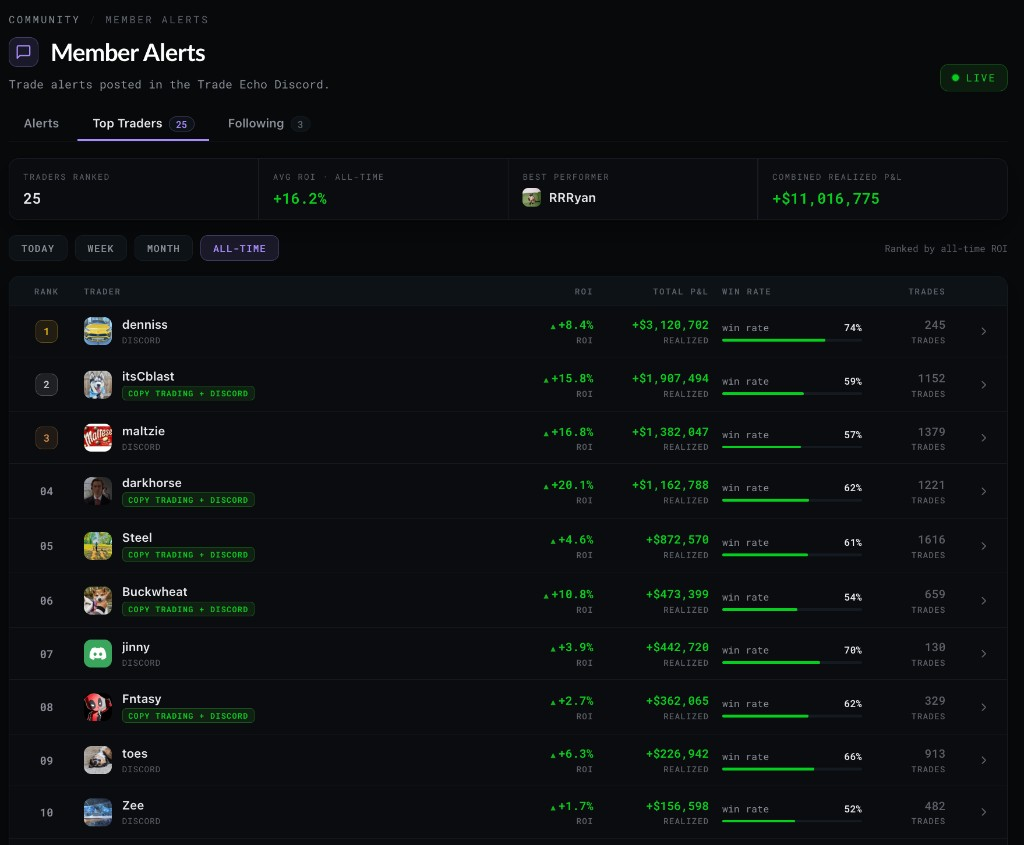
Three tabs
| Tab | What it shows |
|---|---|
| Alerts | Live parsed cards from the member feed (ticker, strike, C/P, action, flags) |
| Top Traders | Leaderboard by day, week, month, or all-time with ROI and win rate - top 3 get medal styling, and a summary strip shows the period's Avg ROI, best trader, and total P/L |
| Following | Traders you follow, Discord link status, per-trader push toggles |
Link Discord
- Open Member Alerts (web sidebar or mobile: Markets → More → Member Alerts)
- Go to the Following tab
- Start Link Discord and complete OAuth in the browser
- Your Trade Echo account ties to the same Discord identity used in the member server
You still post alerts in Discord per bot rules. The app is for reading, ranking, and following.
Follow and notify
- Follow a trader from the Alerts feed or Top Traders leaderboard
- Open a trader profile for win rate, P/L curve, and open or closed trades
- Toggle push notifications per trader on the Following tab
- Use the notification settings entry (bell control on the Alerts feed) to manage alert notifications by trader in one place
Price and line chart alerts are managed separately in the Pulse alerts manager - bell icon on the chart toolbar, on web and mobile.
Filter scopes include copy-trading webhook alerts when pilots post via the platform.
Web vs mobile
Same three-tab experience on web and iOS/Android. Link Discord once; follow and notify from either surface.
Related
- Alert System - how to post alerts in Discord (BTO/STC formats)
- Competitions and Leaderboard - monthly competition rules